 Signify.ink

Email Signatures as a Networking Tool: Turning Every Business Email Into a Digital Introduction
Every business email is more than a message. It is an opportunity to introduce your professional identity, strengthen brand recognition, and make it easier for people to connect with you. A well-designed dynamic email signature can turn everyday correspondence into a consistent and useful networking touchpoint.
Every Email Is a Networking Opportunity
Employees send dozens of emails every week to clients, prospects, suppliers, partners, colleagues, and other professionals. Each message gives recipients a chance to learn who the sender is, understand the company they represent, and find a convenient way to continue the conversation.
Yet the signature at the bottom of an email is often treated as an afterthought. With the right structure, it can become a small but valuable part of a company's wider networking strategy, helping people move from a simple email exchange to a professional connection.
Why Traditional Email Signatures Are Limited
When employees create and update their signatures individually, small inconsistencies can gradually become a company-wide problem. Contact information may become outdated, branding may vary, and useful links may be left out.
Inconsistent Employee Formatting
Different fonts, layouts, colors, and signature lengths can make business communications feel disconnected.
Outdated Contact Details
Job changes, new phone numbers, and updated websites can leave old information circulating in email threads.
Missing Professional Links
Recipients may have no quick way to discover a company website, professional profile, portfolio, or booking page.
Manual Updates Across Teams
As the workforce grows, updating each employee's signature individually becomes time-consuming and difficult to coordinate.
Different Branding Across Departments
Sales, marketing, support, and management may use different versions of company logos, colors, and contact details.
Missed Networking Opportunities
A plain signature may provide only a name and phone number, leaving out links that could help build the next connection.
What Makes a Dynamic Email Signature Different?
A dynamic email signature uses a reusable design and a more organized approach to managing professional information. Depending on the platform and email setup, businesses can maintain approved templates, standardize branding, and simplify changes to shared signature elements.
Instead of asking every employee to build a signature from scratch, organizations can establish a consistent structure while keeping individual details relevant to each person's role.
Use a common layout for names, designations, logos, contact details, and links across the organization.
Keep visual elements aligned with approved brand guidelines and reduce differences between departments.
Make essential information easy to find, read, and use on desktop and mobile email clients.
Where supported, update shared signature content centrally rather than relying entirely on manual edits by individual employees.
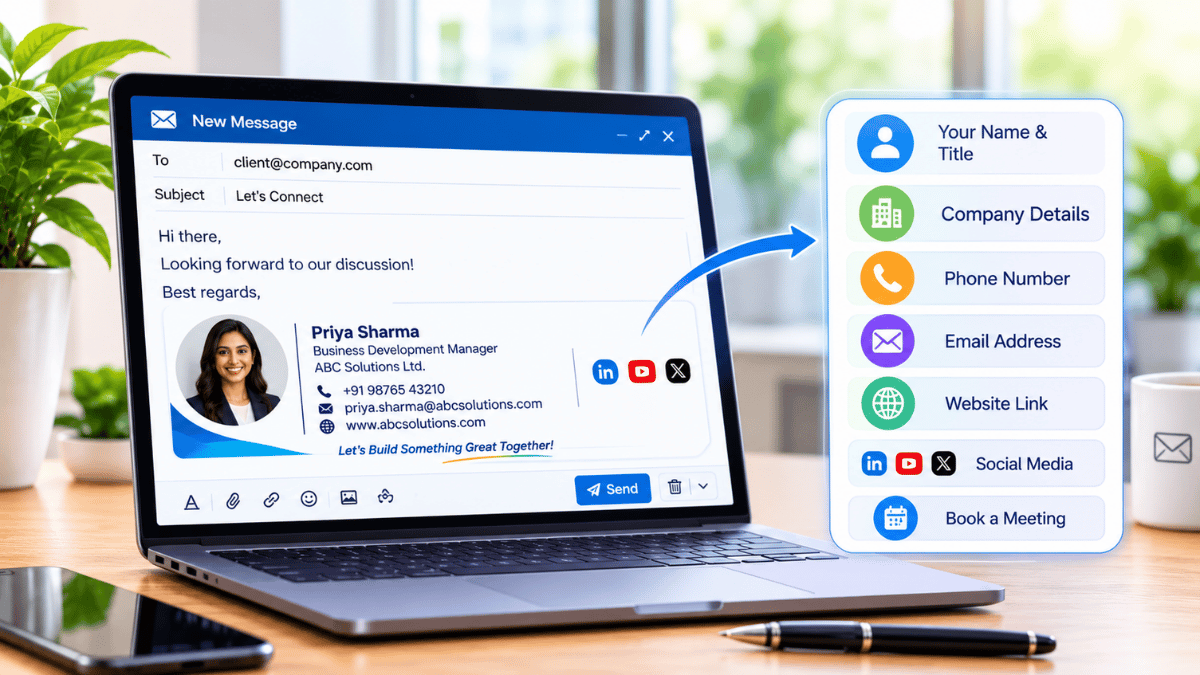
This sample illustrates how essential contact details and selected professional links can be organized in a compact email signature. Replace the example information with approved company details.
Essential Elements of a Professional Email Signature
An effective signature should help people identify the sender and choose an appropriate next step. It does not need to include every possible link; clarity and relevance matter more than quantity.
Name and Designation
Show the sender's full name and current role so recipients can quickly understand who they are communicating with.
Company Logo
Use an approved, appropriately sized logo to reinforce brand recognition without overwhelming the message.
Contact Information
Include relevant work contact details, such as a business phone number or email address, where appropriate.
Company Website
Provide a direct route to company services, product information, resources, or the main business website.
Professional Links
Add selected profiles, portfolios, appointment pages, or other relevant destinations that support the sender's role.
Consistent Design
Use readable typography, restrained colors, clear spacing, and a layout that works across common email clients.
Email Signatures for Growing Organizations
As a business expands, maintaining a consistent professional identity becomes more complex. Employees may work across departments, offices, regions, and time zones, each with different responsibilities and contact details.
A shared signature framework helps create a recognizable experience across the organization while allowing role-specific information to remain accurate. It can also make onboarding easier by giving new employees a clear, approved format to follow.
How Signify Dynamic Email Signatures Help
Signify focuses on creating and sharing digital business cards that bring professional contact details and relevant links together in one place. Dynamic email signatures can complement this approach by extending a person's professional identity into the everyday emails they send.
Rather than treating email signatures and digital business cards as separate experiences, businesses can use them as connected touchpoints: the signature introduces the sender, while a linked digital profile can give interested recipients another way to explore contact information and professional resources.
Support a recognizable professional presentation across email communication and digital contact-sharing experiences.
Where configured, link an email signature to a digital business card so recipients can find relevant contact details in one destination.
Help people move from an email conversation to relevant websites, professional profiles, portfolios, or other selected resources.
Available dynamic signature features and update behavior depend on the platform's current functionality and the organization's email configuration. Confirm supported options before deployment.
Best Practices for Networking-Focused Email Signatures
A signature works best when it supports the message instead of competing with it. Keep the design focused, verify every link, and make sure recipients can easily read and use the information.
Keep it concise. Prioritize the details recipients are most likely to need.
Use relevant links. Select destinations that match the sender's responsibilities and audience.
Check mobile readability. Ensure text, logos, and links remain clear on smaller screens.
Review contact details. Establish a process for correcting outdated titles, phone numbers, and links.
Respect privacy and company policy. Share only approved professional information and avoid unnecessary tracking or promotional clutter.