 Digital Card

The Smartwatch Networking Revolution: Sharing Your Digital Business Card From Your Wrist
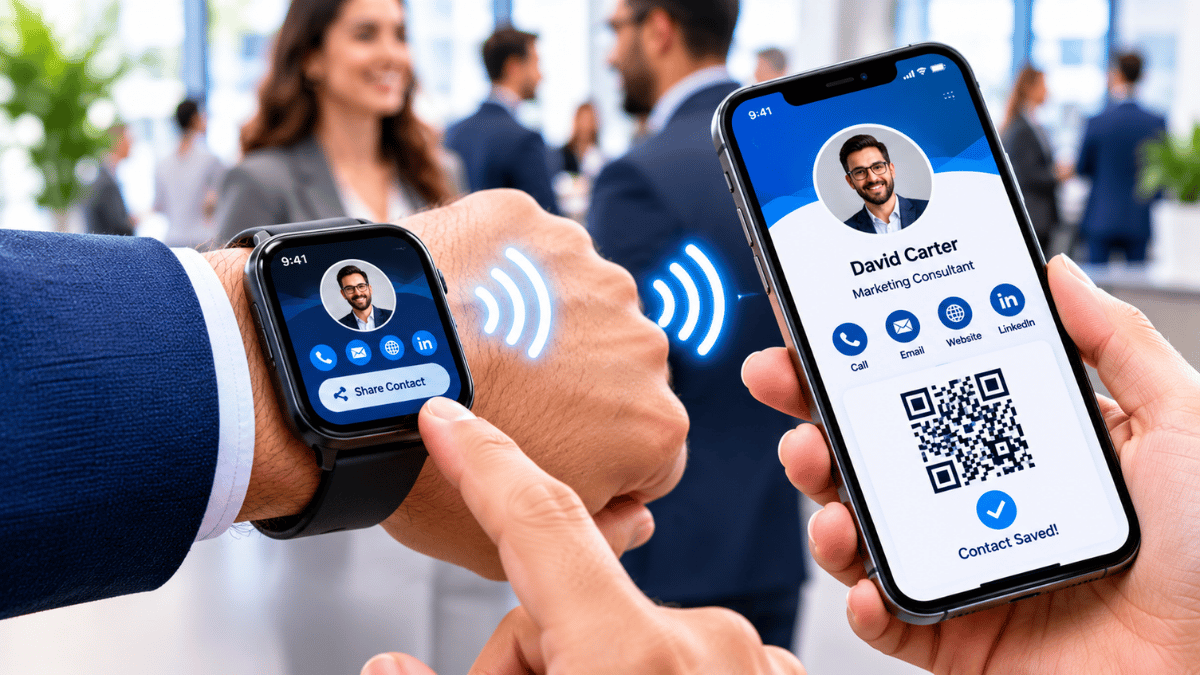
Professional networking is becoming more flexible. With the right wearable setup, a smartwatch can provide quick access to a digital business card, helping professionals share their identity without immediately reaching for a smartphone.
Introduction: Networking Without Reaching for Your Phone
Professionals often need to exchange contact information while attending meetings, exhibitions, conferences, or events. A smartwatch offers another convenient way to access a digital identity.
When a compatible watch can display a sharing interface, profile link, or QR code, it may reduce the steps needed to begin a digital introduction. The experience depends on the watch model, its operating system, the available application, and the sharing method supported.
Why Wearable Networking Matters
Having a sharing tool on your wrist can be useful when you are carrying presentation materials, moving between exhibition booths, or speaking with someone face-to-face. Rather than searching through a phone's apps, you may be able to bring up the relevant sharing option directly on your watch.
Quick Access
Open a prepared sharing interface without navigating through multiple phone screens.
Hands-On Convenience
Keep your professional sharing option available on a device already worn on your wrist.
Digital Follow-Up
Direct new contacts to a digital profile where they can explore relevant details and links.
How Smartwatch Card Sharing Works
Smartwatch sharing generally relies on a compatible wearable app, a profile link, or a sharing feature that can be opened from the watch. Depending on the setup, the watch may display a QR code or provide another way to access the digital profile.
1. Prepare the Sharing Option
Set up a compatible watch app or a supported way to display your digital business card.
2. Open Your Profile or QR Code
Access the sharing interface from the watch when you are ready to make an introduction.
3. Let the Other Person Connect
The other person may scan a displayed QR code with a compatible phone camera to reach your profile.
4. Continue the Conversation
Your contact can review your profile and use the available contact details or links to follow up.
Compatibility matters: Not every smartwatch supports every business-card app or sharing feature. Check app availability and supported functions for your specific wearable before relying on it at an event.
Smartwatch vs Smartphone Sharing
Smartwatches and smartphones can complement each other during networking. A watch is useful for quick access, while a phone is generally better for reviewing detailed information or completing more involved tasks.
| Consideration | Smartwatch | Smartphone |
|---|---|---|
| Accessibility | Convenient when the sharing interface is already set up on the wrist. | Requires retrieving and unlocking the phone when it is not already in use. |
| Screen size | Small display suited to short information and simple actions. | Larger display better for detailed profiles and browsing. |
| Sharing options | May display a QR code or provide supported app-based sharing. | Typically offers broader access to apps, links, messages, and contact tools. |
| Best situations | Quick introductions, busy events, and situations where hands-free access is useful. | Detailed conversations, editing information, and follow-up communication. |
| Dependencies | Depends on watch compatibility, app support, screen readability, and battery. | Depends on phone availability, battery, and network access for online content. |
Practical Applications
Wearable networking can be useful in settings where professionals meet many people and want a convenient way to share their contact destination.
Conferences and Exhibitions
Access your sharing option while moving between sessions, booths, and networking areas.
Sales Meetings
Share a professional profile during introductions and make it easier for prospects to find your details.
Professional Events
Offer another way to access your digital identity during meetups, seminars, and industry gatherings.
Business Travel
Keep your sharing interface close at hand when meeting clients or colleagues on the go.
Informal Introductions
Make it easier to exchange professional information during casual conversations and spontaneous meetings.
How Signify Watch Integration Helps
Signify focuses on digital business cards that bring professional details together in an online profile. Where Signify's smartwatch integration is supported by a compatible device and app setup, it can offer a convenient way to access a professional sharing option from the wrist.
Bring up a supported sharing interface without first navigating to the card on your phone.
Help contacts reach your professional profile through the sharing method available on your device.
Use a digital profile to organize relevant contact information and professional links.
Complement your smartphone with another way to access your business-card sharing tools.
The practical value depends on the supported watch model, application availability, and exact integration features. Before an important event, test the sharing flow on your own device and keep your smartphone available as a backup.
Visit Signify Website →Best Practices for Wearable Networking
A smooth sharing experience depends on preparation as much as convenience. A few simple checks can help ensure your digital business card is ready when an introduction happens.
- Keep the interface accessible: Arrange your supported app or sharing option so it is easy to find.
- Update your profile: Check that your contact details, role, website, and important links are current.
- Test the display: Make sure any QR code is readable at the size shown on your watch.
- Carry an alternative: Keep your smartphone ready or have another sharing method available if the watch is incompatible or its battery runs low.
- Protect your information: Share a public professional profile and avoid displaying sensitive personal details unnecessarily.
- Make follow-up easy: Ensure the profile clearly presents the next step, such as saving contact details or visiting your website.
Conclusion
Smartwatch integration adds another layer of convenience to digital
networking, allowing professionals to access their sharing tools directly
from a wearable device. With a compatible setup, a watch can display a
QR code or provide quick access to a digital profile without requiring
the user to reach for a smartphone at the start of every interaction.
The best approach is to treat the smartwatch as a complement to the phone,
not a complete replacement. Keep your profile updated, test compatibility
in advance, and have an alternative sharing method ready. These simple
steps can help make wearable networking a useful part of your professional
toolkit.