 Signify.ink

Centralized Contact Management for Teams: How to Stop Losing Valuable Business Connections
Business relationships are valuable, but the information behind them can become scattered across personal phones, inboxes, spreadsheets, and disconnected tools. Centralized contact management helps teams organize professional connections in a more accessible, consistent, and secure way.
The Hidden Problem of Scattered Business Contacts
In many organizations, employees collect professional contacts independently. A sales representative may save a prospect's number on a personal phone, a marketing employee may maintain an event spreadsheet, and a manager may keep important introductions buried in email conversations.
Each person may have useful information, but the organization lacks a clear, shared view of the relationships it has built. When an employee changes roles, moves to another department, or leaves the company, important context can become difficult to find or may no longer be accessible to colleagues who need it.
Why Shared Contact Management Matters
Fragmented contact databases create more than administrative inconvenience. They can make collaboration harder, weaken follow-up, and prevent teams from building on relationships that colleagues have already established.
Information Stays in Silos
Employees may maintain separate records, leaving colleagues unaware of contacts already known to the business.
Follow-Ups Get Missed
Without shared context, teams can lose track of previous discussions, commitments, or the next step in a conversation.
Relationships Depend on Individuals
Important business knowledge can leave with an employee when records and relationship history are not appropriately shared.
Duplicate Records Accumulate
Different teams may store the same contact under different names or with conflicting information.
Cross-Team Collaboration Slows Down
Employees may need to repeatedly ask colleagues for introductions, contact details, or background information.
Relationship History Gets Lost
Without notes and clear ownership, a contact's previous interactions with the company may be difficult to reconstruct.
When relationship information is scattered, teams may spend more time searching for context and less time acting on useful connections. A shared process helps make that information easier to maintain and use.
What Is Centralized Contact Management?
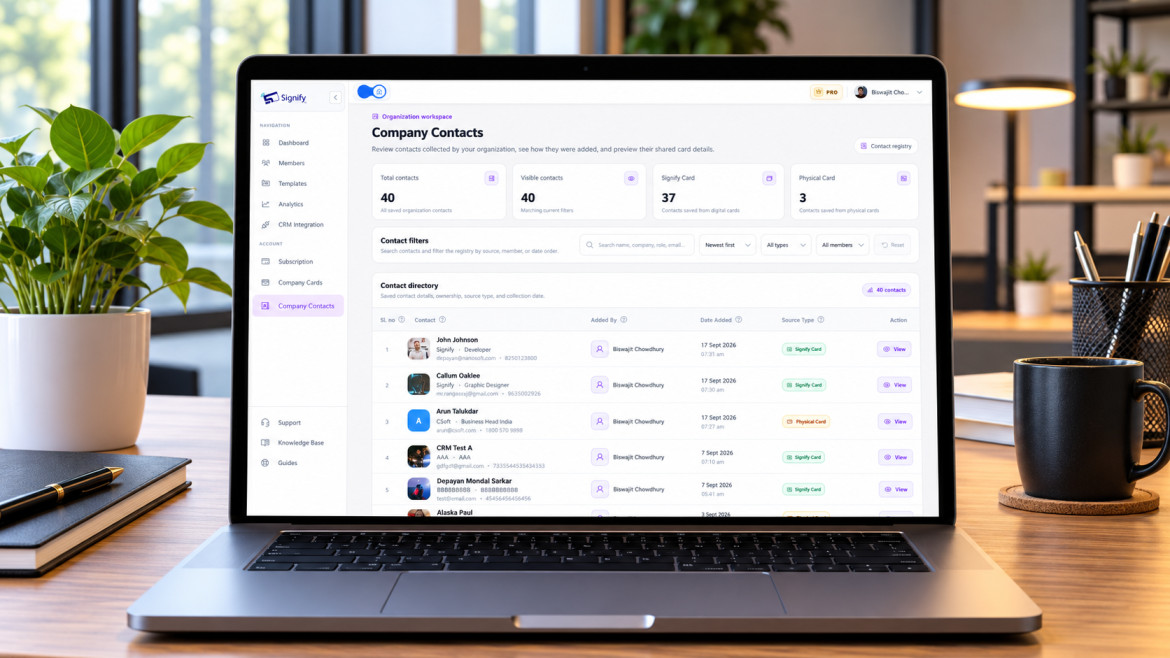
Centralized contact management is an approach to storing and organizing business contact information in a shared organizational repository. Instead of leaving every record in an individual employee's tools, the business establishes a common place where authorized team members can find relevant contacts and relationship context.
Depending on the system, the repository may include contact details, categories, notes, relationship ownership, and access controls that determine who can view or update information.
Store approved business contacts in one organized location instead of relying entirely on individual records.
Keep relevant notes, tags, and interaction details alongside contact information where supported.
Make useful records discoverable to the people who need them, according to their assigned permissions.
Help colleagues maintain business relationships when responsibilities change or teams collaborate.
Exact workflows depend on the contact management platform, team setup, and permissions configured by the organization.
Organizing Contacts With Tags and Notes
A shared contact list becomes more useful when employees can quickly understand who a contact is, why the relationship matters, and what the team should remember. Tags and notes can add this context without forcing employees to search through long email threads.
Met during the industry networking event. Interested in discussing a possible partnership. Marketing team to share the relevant company overview and coordinate the next conversation.
Categorize Contacts by Industry
Use consistent labels for industries, business types, event sources, customers, suppliers, or potential partners.
Record Meeting Details
Capture the key points of a discussion while they are still fresh and useful to the relationship.
Add Follow-Up Context
Note agreed next steps, relevant interests, or which colleague should continue the conversation.
Identify Important Prospects
Apply consistent, factual categories to help teams prioritize relevant business relationships.
Organize Shared Connections
Help colleagues recognize contacts connected to shared projects, events, accounts, or partnerships.
Shared Contacts Across Departments
Different teams interact with different people, but their relationships often support the same wider business goals. When contact information and relevant context are shared appropriately, departments can work together without repeatedly rebuilding the same knowledge.
Sales Teams
Find existing relationships, review previous conversations, and coordinate follow-ups with prospects or customers without relying only on an individual salesperson's records.
Marketing Teams
Organize contacts from events, campaigns, and partnerships so relevant relationship context can inform appropriate future communication.
Management
Improve continuity when responsibilities change and help maintain visibility into important organizational relationships, subject to access permissions.
Customer-Facing Teams
Use available contact history and notes to provide more consistent service and reduce the need for customers or partners to repeat information.
How Signify's Shared Contact Management Works
Signify focuses on digital business cards and professional contact sharing. A shared contact management workflow can help teams move beyond collecting individual contacts and toward a more organized view of the business relationships they build through networking.
For teams, the value of centralized contact management comes from bringing useful records together, keeping relationship context organized, and making information available to the right colleagues. Features such as shared contacts, tags, notes, team visibility, and permission-based access should be used according to the options supported by the organization's Signify setup.
Keep business contact information in an organized shared workspace where the supported setup allows team access.
Use categories and relationship context to make contact records easier to understand and search.
Help authorized colleagues discover relevant connections and maintain continuity across collaborative work.
Feature availability, team-sharing behavior, tagging, notes, and permission controls depend on Signify's current product capabilities and account configuration. Confirm the available features before presenting them as enabled in a particular plan.
Keep Shared Contact Data Organized and Protected
Centralization should improve collaboration without giving every employee unrestricted access to every contact. Establish clear ownership, consistent record-keeping practices, and access rules that reflect business needs.
Use permission-based access. Give employees access to the contact information required for their roles.
Keep records accurate. Review duplicate entries, outdated details, and changes in relationship ownership.
Write useful, professional notes. Record relevant business context and avoid unnecessary personal or sensitive information.
Set clear team processes. Define how contacts are added, categorized, updated, shared, and retained in accordance with company policy.